PayPal
 Stripe
 QuickBooks
 Zoom
Zoom Google Meet
 Slack
Slack Zapier
 Mailchimp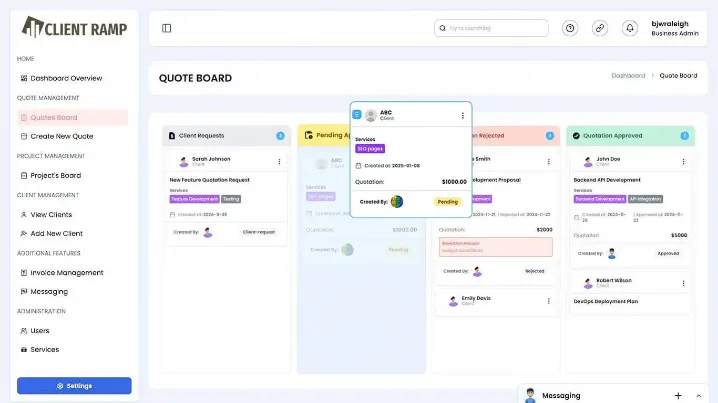
Ever wondered why your CRM isn’t actually helping you grow—despite having all your contacts neatly stored? If your system stops at names, emails, and phone numbers, you’re barely scratching the surface of what a modern CRM should do.
In today’s competitive landscape, especially for service-based businesses, your CRM needs to go far beyond contact storage. It should connect clients, projects, employee timesheets, quotes, and payments into one powerful workflow.
Let’s break down the 10 things your CRM should really be doing—and why it matters for your bottom line.
1. Centralize Client and Project Management
A CRM should act as your command center—not just a digital address book.
You should be able to:
- Track client interactions
- Manage ongoing projects
- Store all communication in one place
This eliminates confusion and ensures everyone on your team is aligned.
2. Integrate Employee Timesheets Seamlessly
If your CRM doesn’t include employee timesheets, you’re missing critical business intelligence.
Time tracking should be:
- Linked directly to clients and projects
- Easy for employees to update in real time
- Automatically categorized as billable or non-billable
This is the foundation for accurate billing and profitability analysis.
3. Enable Data-Driven Quotes
Still creating quotes based on rough estimates?
A powerful CRM uses historical employee timesheet data to help you:
- Predict project timelines
- Price services accurately
- Avoid underquoting
Better data leads to better margins.
4. Convert Quotes Into Projects Instantly
Once a client approves a quote, your CRM should automatically:
- Create a project
- Assign tasks
- Set timelines
No manual setup, no delays—just a smooth transition from sales to execution.
5. Provide Real-Time Workload Visibility
Can you instantly see who’s working on what?
A modern CRM should give you:
- Team workload distribution
- Project progress tracking
- Time spent vs time estimated
This helps prevent bottlenecks and burnout.
6. Automate Invoicing from Timesheets
Why manually calculate invoices when the data already exists?
With integrated employee timesheets, your CRM should:
- Generate invoices based on tracked hours
- Reduce human error
- Speed up billing cycles
Faster invoicing means faster payments.
7. Track Client Profitability
Not all clients are equally valuable.
Your CRM should help you identify:
- High-profit clients
- Time-draining projects
- Opportunities to optimize pricing
This insight is only possible when timesheets and financial data are connected.
8. Streamline Communication
No more digging through emails or chat threads.
A CRM should centralize:
- Client conversations
- Project updates
- Internal team notes
This improves transparency and reduces miscommunication.
9. Generate Actionable Reports
Data is only useful if you can understand it.
Your CRM should provide:
- Timesheet reports
- Revenue insights
- Performance analytics
These reports help you make smarter, faster decisions.
10. Support Scalable Growth
As your business grows, your CRM should grow with you.
That means:
- Handling more clients without added complexity
- Automating repetitive tasks
- Maintaining accuracy and efficiency at scale
Without this, growth becomes chaotic instead of controlled.
Why ClientRamp Delivers on All Fronts
ClientRamp is built to do exactly what traditional CRMs fail to achieve—connect every part of your business.
With ClientRamp, you get:
- End-to-end client and project management
- Built-in employee timesheets for accurate tracking
- Seamless quote-to-invoice workflows
- Real-time insights into productivity and profitability
It’s not just about storing contacts—it’s about transforming how your business operates.
Final Thoughts
So, is your CRM just a contact database—or a growth engine?
If it’s not helping you manage projects, track employee timesheets, generate accurate quotes, and streamline payments, it’s costing you more than you realize.
The right CRM doesn’t just organize your data—it turns it into action, efficiency, and profit.