PayPal
 Stripe
 QuickBooks
 Zoom
Zoom Google Meet
 Slack
Slack Zapier
 Mailchimp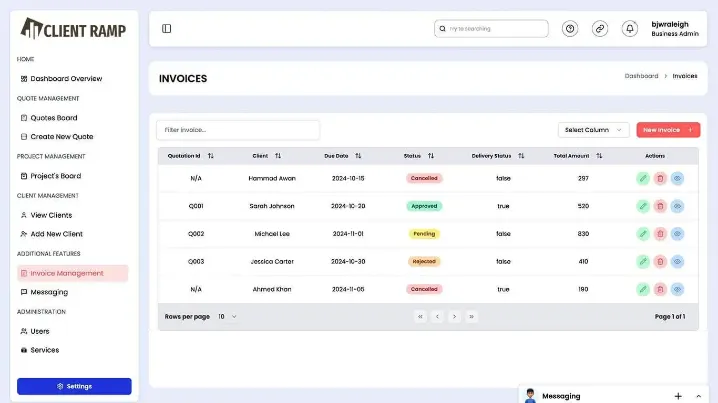
Ever picked a CRM because it “looked popular,” only to realize later it doesn’t actually fit how your business works? That’s a common (and expensive) mistake—especially when your operations depend on more than just tracking leads.
How to Choose the Right CRM for Your Business Needs
Introduction: Choosing a CRM Isn’t Just About Features
Most guides will tell you to compare features, pricing, and integrations. But here’s the real question:
Does your CRM reflect how your business actually runs—day to day?
In 2026, businesses don’t just need a CRM for sales. They need a system that connects:
- Clients
- Projects
- Team productivity
- Revenue and profitability
That’s why platforms like ClientRamp are gaining attention—they bring employee timesheets directly into the CRM experience.
Step 1: Start With Your Business Workflow (Not the Tool)
Before evaluating any CRM, map how your business operates:
- How do leads become clients?
- How is work delivered after a deal is closed?
- How does your team track time and effort?
If your workflow includes project delivery or client servicing, a CRM without timesheets will create gaps.
Key insight:
A CRM should mirror your workflow—not force you to adapt to it.
Step 2: Identify the Hidden Cost of Disconnected Tools
Many businesses use:
- One tool for CRM
- Another for time tracking
- Another for invoicing
At first, it seems manageable. But over time:
- Data gets duplicated
- Reporting becomes inconsistent
- Teams lose visibility
Choosing a CRM with built-in timesheets eliminates these issues by keeping everything in one place.
Step 3: Look Beyond Sales—Focus on Profitability
Most CRMs help you track revenue. But very few help you understand profitability.
Ask yourself:
- How much time does my team spend on each client?
- Are we over-servicing certain accounts?
- Which projects are actually profitable?
With ClientRamp:
- Employee timesheets are directly linked to clients and projects
- You can measure effort vs revenue instantly
- You gain clarity on where your business is truly making money
This is a major advantage when making pricing and scaling decisions.
Step 4: Evaluate Ease of Use and Adoption
Even the most powerful CRM fails if your team doesn’t use it.
Look for:
- Simple UI and onboarding
- Minimal training requirements
- Clear workflows for logging time and managing tasks
When timesheets are part of the CRM (instead of a separate tool), adoption becomes much easier—because your team works in one system instead of switching between multiple apps.
Step 5: Ensure Real-Time Visibility Across Teams
A good CRM doesn’t just store data—it provides visibility.
You should be able to:
- See project progress instantly
- Track team workload in real time
- Identify bottlenecks early
With integrated timesheets:
- Managers know who is working on what
- Sales teams understand delivery capacity before closing deals
- Leadership gets a complete view of operations
Step 6: Choose a CRM That Scales With You
What works for a small team today should still work when you grow.
Avoid systems that:
- Require multiple add-ons for basic functionality
- Become complex as you scale
- Force you to migrate later
A scalable CRM like ClientRamp grows with your business by combining:
- Client management
- Project tracking
- Employee timesheets
- Invoicing and payments
All in one ecosystem.
Step 7: Align Your CRM With Modern Search and Growth Trends
From an SEO, GEO, and AEO perspective, businesses today are actively searching for:
- “CRM with timesheet tracking”
- “All-in-one CRM for small business”
- “CRM for managing clients and projects”
This shift shows that the market is moving toward unified solutions—not fragmented tools.
Choosing a CRM that aligns with these needs doesn’t just improve operations—it positions your business for smarter growth.
Conclusion: The Right CRM Is the One That Connects Everything
Choosing a CRM isn’t about picking the most popular tool—it’s about selecting the one that fits your business model.
When employee timesheets are integrated into your CRM, you unlock:
- Better decision-making
- Accurate profitability tracking
- Stronger team alignment
- Improved customer retention
That’s why solutions like ClientRamp stand out—they go beyond managing relationships and help you manage your entire business.