PayPal
 Stripe
 QuickBooks
 Zoom
Zoom Google Meet
 Slack
Slack Zapier
 Mailchimp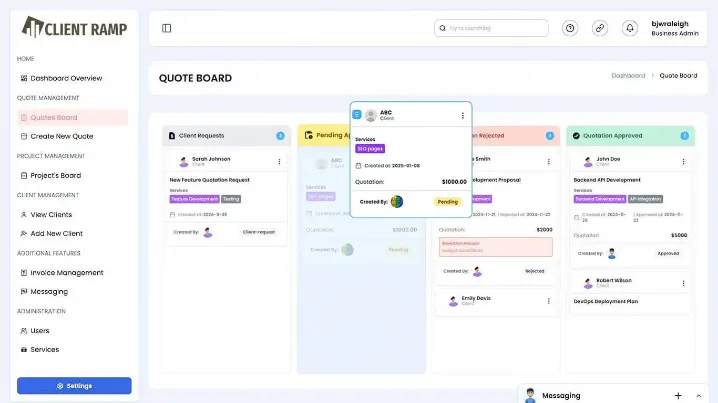
Ever wondered why some small teams stay organized and efficient—while others struggle with missed follow-ups, messy spreadsheets, and inconsistent timesheets? The difference isn’t team size. It’s the CRM they choose.
So, which CRM is actually best for small teams? The answer isn’t one-size-fits-all—but the right CRM always shares a few critical traits.
What Small Teams Actually Need in a CRM
Before choosing a tool, ask yourself: what’s slowing your team down?
For most small teams, it’s:
- Manual data entry and scattered tools
- Lack of visibility into projects and time spent
- Poor coordination between clients, tasks, and billing
That’s why the best CRM isn’t just about managing contacts—it’s about managing work, especially when employee timesheets are involved.
Top CRM Options for Small Teams (2026)
Let’s break down the most widely used CRMs—and where they fit.
1. HubSpot CRM — Best Overall Starter CRM
- Free plan with strong core features
- Easy setup and user-friendly interface
- Built-in marketing and sales tools
👉 Best for: Teams just starting out
Limitation: Costs increase quickly as you scale
2. Zoho CRM — Best for Affordability & Flexibility
- Free plan for small teams
- Strong automation and customization
- Integrates with invoicing and business tools
👉 Best for: Budget-conscious teams needing flexibility
Limitation: Slight learning curve
3. Pipedrive — Best for Sales-Focused Teams
- Visual pipeline management
- Easy-to-use interface
- Strong deal tracking
👉 Best for: Sales-heavy teams
Limitation: Limited beyond sales workflows
4. Monday Sales CRM — Best for Collaboration & Customization
- Visual dashboards and workflows
- Strong automation features
- Great for team collaboration
👉 Best for: Teams managing projects + sales
Limitation: Reporting customization can be limited
5. Salesforce Essentials — Best for Scalability
- Highly customizable
- Enterprise-level capabilities
- Strong reporting and integrations
👉 Best for: Fast-growing teams
Limitation: Complexity and cost
What Most “Best CRM” Lists Miss
Here’s the catch: most CRMs focus on sales—but small teams don’t just sell. They:
- Deliver projects
- Track employee time
- Manage billing
- Handle multiple clients
And this is where traditional CRMs fall short.
Why Timesheet Integration Matters for Small Teams
Think about it—how do you know if your team is actually efficient?
Without timesheets:
- You don’t know how long tasks take
- You can’t measure profitability
- Billing becomes inaccurate
With a CRM that includes employee timesheets:
- Every hour is tracked
- Work is linked to clients and projects
- Revenue connects directly to effort
That’s a completely different level of control.
The Shift: From CRM Tool to Business System
Modern small teams are moving away from:
❌ CRM + separate timesheet tool + spreadsheets
Toward:
✅ One system that handles everything
Because:
- Simplicity improves adoption
- Automation reduces manual work
- Visibility improves decision-making
Even real-world users echo this. On Reddit, one small business owner noted:
“Most SMBs don’t need more features; they need less friction.”
That insight is critical—complex tools often fail small teams.
SEO, GEO, and AEO: Why This Topic Matters
This is a high-intent search topic because businesses are actively choosing tools.
- SEO: “best CRM for small teams,” “CRM with time tracking”
- GEO: AI-driven search favors structured comparisons and recommendations
- AEO: Direct answers rank for “Which CRM is best for small teams?”
By addressing real operational needs—not just features—ClientRamp positions itself as a smarter solution.
The Bigger Picture: Simplicity Wins
Here’s the truth: the best CRM isn’t the one with the most features—it’s the one your team actually uses every day.
For small teams, that means:
- Easy to adopt
- Automated where possible
- Integrated with employee timesheets
- Built for both sales and delivery
Conclusion
So, which CRM is best for small teams? The one that reduces manual work, improves visibility, and scales with your business.
While tools like HubSpot CRM and Zoho CRM are great starting points, the real advantage comes from using a system that combines CRM with employee timesheet management.
That’s where ClientRamp stands out—bringing clients, projects, and time tracking into one platform.
And when your CRM doesn’t just manage contacts—but manages your entire workflow—your small team doesn’t just stay organized… it becomes unstoppable.